Presentation Template - Evergreen: Design Guide
In the fast-paced world of professional communication, the difference between a forgettable meeting and a compelling narrative often comes down to visual structure. The Presentation Template - Evergreen addresses this challenge by providing a robust, versatile framework designed for longevity rather than fleeting trends. Unlike niche templates that become obsolete when design fashions shift, this asset focuses on clean lines, functional layouts, and adaptable aesthetics. It serves as a foundational tool for professionals who need to convey complex information clearly without spending hours wrestling with formatting or searching for stock assets.
For entrepreneurs, educators, and creatives, time is the most valuable resource. This template streamlines the creation process through a master slide architecture that ensures consistency across all 35 included slides. Whether you are building a pitch deck for investors or a portfolio to showcase photography, the underlying structure remains solid. The "evergreen" nature of the design means it avoids overly stylized elements that might date your content, making it a reliable choice for recurring presentations, annual reports, or evergreen educational courses that require periodic updates without total redesigns.
Core Features That Drive Efficiency
The true value of any presentation asset lies in its usability. The Presentation Template - Evergreen distinguishes itself through technical features that prioritize the end-user's workflow. At the heart of the system is a comprehensive set of 35 unique slides. This volume provides enough variety to cover extensive topics while remaining curated enough to prevent decision fatigue. Each slide is built upon master slides, meaning global changes to fonts, colors, or logos propagate instantly throughout the deck. This feature alone saves hours of manual editing and eliminates the risk of inconsistent branding.
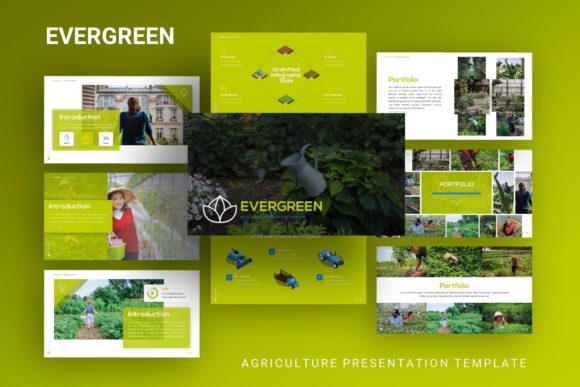
Visual communication is further enhanced by handcrafted infographics directly within PowerPoint. Rather than relying on external software like Illustrator or Canva, users can edit charts, diagrams, and data visualizations natively. These vector-based illustrations are pixel-perfect and fully resizable, ensuring they look crisp on everything from laptop screens to large conference room projectors. Because they are editable shapes rather than static images, you can adjust colors to match your brand guidelines or modify data points as your metrics evolve. This native integration is crucial for maintaining an efficient workflow during high-pressure preparation periods.
- Master Slide Architecture: Ensures global consistency and rapid rebranding capabilities.
- Native Vector Infographics: Editable charts and diagrams that scale without quality loss.
- Drag-and-Drop Placeholders: Simplifies image insertion and layout adjustments.
- Comprehensive Documentation: Reduces the learning curve for non-designers.
- Vector Icon Set: Included assets to maintain visual cohesion without extra purchases.
Versatile Applications Across Industries
One of the strongest attributes of the Presentation Template - Evergreen is its adaptability across different professional verticals. For creative agencies and freelancers, the template offers sophisticated layouts suitable for portfolios and case studies. The picture placeholders are designed with drag-and-drop functionality, allowing photographers and designers to swap preview images for their own work in seconds. The minimalist aesthetic ensures that the visual focus remains on the portfolio pieces themselves, rather than being distracted by ornate slide borders or clashing background patterns.
In the corporate and startup sectors, clarity is paramount. When pitching to stakeholders or presenting quarterly results, the ability to visualize data effectively can determine the outcome of a meeting. The included handcrafted infographics allow business professionals to transform dry spreadsheets into engaging visual narratives. Startups can utilize specific slide layouts designed for problem-solution frameworks, market analysis, and team introductions. Because the template includes vector icons and editable graphics, companies can maintain strict brand compliance without needing a dedicated designer for every internal update or external pitch.
Educators and trainers also benefit significantly from this structured approach. Creating course materials often involves repurposing content for different audiences or updating statistics semester after semester. The evergreen design philosophy supports this iterative process perfectly. Instructors can create a master course deck and easily duplicate sections for workshops, webinars, or guest lectures. The clean typography and ample whitespace improve readability and cognitive retention for students, proving that good design is also good pedagogy.
Strategic Benefits for Personal Branding
Beyond organizational use, individuals leveraging personal branding will find immense value in this toolkit. Bloggers, consultants, and speakers often need media kits or speaker decks that reflect their personal identity professionally. The Presentation Template - Evergreen provides a polished canvas that elevates personal content above standard, generic slides. By customizing the color palette and typography to match a personal website or social media presence, creators can build a cohesive cross-platform identity. The inclusion of documentation ensures that even those without formal design training can achieve professional-grade results, democratizing access to high-quality visual communication.
Practical Considerations for Implementation
While the Presentation Template - Evergreen is designed for ease of use, maximizing its potential requires some strategic planning. First, it is important to understand the file structure before diving in. Reviewing the included documentation file is highly recommended, as it explains how to manipulate master slides and utilize the vector icon set effectively. Skipping this step often leads to users manually formatting individual slides, which defeats the purpose of using a template system. Taking thirty minutes to understand the architecture will save dozens of hours over the life of the project.
Users should also be mindful of asset management. As noted in the product specifications, demo images are for preview purposes only and are not included in the download. This is actually a benefit, as it prevents legal issues related to image licensing and encourages the use of original or properly licensed photography. Before starting a project, gather your visual assets in a dedicated folder. Having your logo files (preferably in PNG or SVG format), brand color codes, and high-resolution images ready will make the drag-and-drop process seamless. This preparation phase is critical for maintaining momentum during the actual design work.
Customization should always serve the content, not overshadow it. With 35 slides available, there is a temptation to use every unique layout. However, effective presentations rely on rhythm and repetition. Select a subset of slides that best support your specific narrative arc. Use the infographic slides for data-heavy sections and the image-focused slides for emotional or illustrative moments. Consistency in layout choices helps guide the audience’s attention and reduces cognitive load. Remember that the template is a vessel for your message; the goal is to enhance comprehension, not to showcase every feature of the file.
Evaluating Long-Term Value
When selecting digital assets, professionals must consider return on investment. The Presentation Template - Evergreen offers significant long-term value because it decouples content creation from design creation. Once the initial setup and branding customization are complete, future presentations become primarily about content strategy rather than visual production. This shift allows teams to respond faster to market changes, update training materials more frequently, and iterate on pitch decks based on feedback without starting from scratch each time.
Furthermore, the technical compatibility of the .PPTX format ensures broad accessibility. Unlike proprietary design files that require expensive software subscriptions, this template works within the Microsoft ecosystem that most organizations already possess. This reduces friction when collaborating with colleagues or sending files to clients. The vector-based nature of the graphics also future-proofs the asset against resolution changes, ensuring it remains usable as display technologies advance. For anyone serious about professional communication, investing in a high-quality, structurally sound template is a practical decision that yields dividends in both time savings and perceived professionalism.