Fiont Google Slide Template: Design for Any Audience
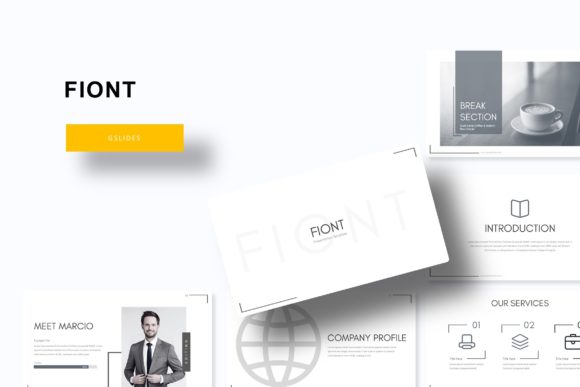
Creating a compelling presentation often feels like a balancing act between aesthetic appeal and functional clarity. The Fiont Google Slide Template addresses this challenge by providing a comprehensive design system rather than just a collection of disjointed layouts. With 150 total slides distributed across five distinct premade color themes, this resource offers a structured foundation for visual storytelling. Whether you are preparing a quarterly business review, an educational lecture, or a creative portfolio, the template’s architecture supports diverse communication goals without requiring advanced graphic design skills.
Why Visual Consistency Matters Across Different Roles
The value of a robust slide deck extends beyond simple aesthetics; it directly impacts how information is received and retained. However, the specific benefits vary significantly depending on who is using the tool and what they aim to achieve.
For entrepreneurs and small business owners, time is often the most scarce resource. The primary priority here is speed combined with professional credibility. Fiont provides 30 slides per color variation, allowing business users to quickly assemble investor decks or client proposals without starting from scratch. The inclusion of handcrafted infographics in PowerPoint format means that complex data regarding market growth or revenue streams can be visualized instantly. Instead of spending hours aligning shapes and charts, a business owner can focus entirely on refining their narrative and validating their business model.
Educators and trainers face a different set of challenges. Their goal is engagement and knowledge retention. The pixel-perfect illustrations and section break slides included in Fiont serve as cognitive anchors, helping students navigate through dense material. When teaching a multi-hour workshop, the ability to switch between content-heavy slides and visual breathing room helps maintain audience attention. The resizable and editable graphic placeholders allow instructors to customize examples relevant to their specific curriculum, making abstract concepts more tangible for learners.
Creatives, freelancers, and marketers often evaluate templates based on flexibility and uniqueness. While pre-made designs save time, there is a fear of looking generic. Fiont mitigates this through its master slide structure and drag-and-drop functionality. A photographer showcasing a portfolio or a marketer presenting a campaign strategy can utilize the gallery and portfolio slides as a starting point, then heavily modify the layout to match a specific brand identity. The five color variations provide enough distinction that two different clients could use the same base template without their presentations looking identical.
Evaluating Quality and Usability Factors
When selecting a presentation asset, different users weigh specific criteria differently. Understanding these priorities helps determine if Fiont aligns with your current project needs.
- Ease of Use vs. Customization Depth: Beginners often prioritize intuitive interfaces. Because Fiont is built on Master Slides, global changes—such as updating a logo or changing a font family—can be applied across all 150 slides simultaneously. This reduces the technical barrier for those unfamiliar with slide masters. Conversely, experienced designers appreciate that the elements are fully editable vectors rather than flattened images, allowing for deep customization without breaking the layout.
- Cost Efficiency and Value: For consumers and hobbyists, budget is frequently a deciding factor. Acquiring five PPTX files and five widescreen versions in a single package offers significant utility per dollar. The inclusion of free font download links in the Readme file eliminates hidden costs associated with premium typography, ensuring the final product looks exactly like the preview without additional licensing fees.
- Reliability and Technical Compatibility: Professionals working in corporate environments need assurance that files will render correctly across different systems. The provision of both standard and widescreen PPTX formats ensures compatibility whether presenting on an older projector or a modern 4K display. This reliability reduces technical anxiety before high-stakes meetings.
Practical Applications for Specific Projects
To better understand how this template functions in real-world scenarios, consider how different user types might leverage specific features within the Fiont ecosystem.
The Startup Pitch Deck
A founder raising seed capital needs to convey trust and vision rapidly. They would likely select one of the five premade colors that aligns with their brand psychology—perhaps a blue theme for stability or a vibrant orange for innovation. Using the handcrafted infographic slides, they can visualize user acquisition metrics or competitive landscapes clearly. The section break slides help structure the pitch into digestible chapters (Problem, Solution, Market, Team), guiding investors through the logic flow seamlessly.
The Academic Thesis Defense
A graduate student defending their research requires a clean, distraction-free environment that highlights methodology and findings. They might utilize the picture placeholders to display fieldwork photography or lab equipment, using the drag-and-drop feature to swap images while maintaining consistent framing. The extensive slide count allows them to prepare backup slides for potential questions, keeping the main presentation concise while having detailed data readily accessible if queried by the panel.
The Freelance Service Proposal
A web designer or consultant sending a proposal needs to demonstrate their own design sensibility. They can use the gallery slides to showcase previous case studies, treating the presentation itself as a sample of their work. Because the graphics are pixel-perfect and editable, they can adjust iconography to match the prospective client’s industry, creating a bespoke feel that increases perceived value and win rate.
Understanding What Is Included and Excluded
Managing expectations is crucial for a smooth workflow. When downloading Fiont, users receive a comprehensive package designed for immediate deployment. The bundle contains five PPTX files corresponding to the five color themes, along with five widescreen variants to accommodate modern display ratios. A Readme First file is included to guide setup, specifically providing links to download the free fonts used in the design. This ensures typographic consistency right from the first edit.
It is important to note a standard limitation common to digital design assets: all photographs or pictures used in the preview are not included. These images are intended solely for illustration purposes to demonstrate layout potential. Users must supply their own imagery. While this requires an extra step, it ultimately benefits the presenter by ensuring the final deck features authentic, relevant visuals rather than generic stock photography that might dilute the message.
Determining If This Template Fits Your Goals
Fiont Google Slide Template is best suited for individuals and organizations that value a balance of structure and creative freedom. It is an excellent match for:
- Non-designers who need professional results without learning complex software.
- Agencies and teams requiring a standardized yet flexible visual language across multiple projects.
- Educators looking to modernize their lecture materials with minimal effort.
- Marketers who need to produce high-volume content assets quickly.
However, it may be less suitable for users seeking highly niche, industry-specific diagrams (like detailed engineering schematics) or those who prefer building every element from absolute zero for artistic reasons. For the vast majority of general business, educational, and creative presentations, the combination of 150 slides, master slide architecture, and versatile color options provides a reliable pathway to clearer, more effective communication.
Ultimately, the effectiveness of any presentation tool depends on how well it serves the storyteller. By reducing friction in the design process, Fiont allows users to redirect their energy toward what matters most: crafting a message that resonates with their specific audience. Whether you are explaining a complex concept to students, pitching a new product to stakeholders, or sharing a personal passion project, having a solid visual foundation transforms the presentation experience from a chore into a strategic advantage.