Designing Impactful Welfare Narratives with the Welfare Presentation Template
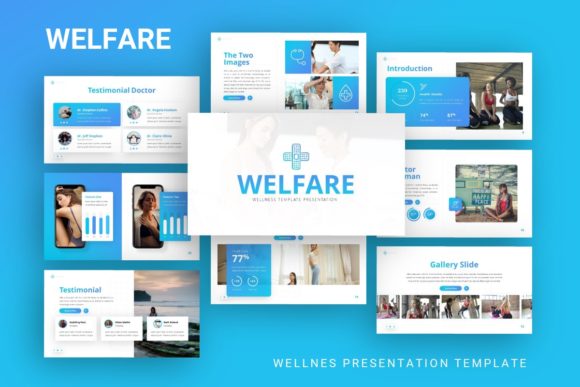
Communicating complex social initiatives, corporate wellness programs, or community support structures requires more than just data; it demands a visual narrative that resonates emotionally while maintaining professional credibility. The challenge for organizations ranging from non-profits to creative agencies lies in balancing aesthetic appeal with informational clarity. When stakeholders review proposals for welfare projects, the quality of the presentation often serves as a proxy for the quality of the program itself. Utilizing specialized design assets like the Presentation Template - Welfare provides a structured foundation for this delicate balance, offering a comprehensive suite of 35 slides designed specifically to articulate care, support, and organizational health.
Versatile Applications Across Professional Sectors
While the nomenclature suggests a focus on social services, the architectural flexibility of this template extends its utility far beyond traditional welfare organizations. The underlying design principles prioritize empathy and clarity, which are universal requirements across multiple industries. Understanding these diverse applications helps professionals leverage the asset effectively.
Corporate Wellness and Human Resources
In the modern corporate landscape, employee well-being has transitioned from a peripheral benefit to a central strategic pillar. HR departments and internal communications teams frequently need to present mental health initiatives, benefits overhauls, or workplace safety protocols. The handcrafted infographics included in this template allow for the visualization of abstract concepts like "work-life balance" or "psychological safety" without resorting to clichéd stock photography. By using editable vector icons and clean layouts, companies can present sensitive internal data with dignity and professionalism, ensuring that wellness programs are perceived as genuine investments rather than compliance checkboxes.
Creative Agencies and Portfolio Showcases
Creative professionals often struggle to present their own work with the same polish they offer clients. For agencies specializing in social impact branding, healthcare marketing, or educational content, this template serves as an ideal portfolio vehicle. The pixel-perfect illustrations and master slide architecture provide a cohesive backdrop for showcasing case studies. Unlike generic business templates that may feel too sterile for creative work, the Welfare aesthetic incorporates softer color palettes and organic shapes that complement artistic portfolios while maintaining enough structure to satisfy corporate procurement teams reviewing pitch decks.
Startups and Social Enterprises
For startups operating in the health-tech, ed-tech, or social enterprise spaces, the pitch deck is the primary tool for securing funding. Investors in these sectors look for evidence of both scalability and social consciousness. The Presentation Template - Welfare bridges this gap by combining startup-friendly layouts (such as problem-solution slides and market analysis grids) with a visual language that signals mission-driven intent. The ability to drag and drop images into pre-formatted placeholders allows founders to rapidly iterate their decks based on investor feedback without breaking the visual consistency of their brand narrative.
Technical Architecture and Customization Workflow
The practical value of any presentation asset is determined by how easily it integrates into existing workflows. This template is engineered around Master Slides, a feature that distinguishes professional-grade assets from amateur designs. Understanding this technical foundation is crucial for maximizing efficiency.
Master Slide Efficiency
Rather than formatting individual slides one by one, users can modify global elements through the Master Slide view. This ensures that changes to typography, color schemes, or logo placement propagate instantly across all 35 slides. For teams managing multiple presentations—such as a regional welfare office producing reports for different districts—this capability reduces production time significantly. It also prevents the "visual drift" that occurs when multiple team members edit a deck independently, ensuring brand compliance remains intact regardless of who creates the content.
Vector Graphics and Scalability
A critical consideration for professional presentations is resolution independence. All graphics within this ecosystem are fully resizable and editable vectors. This means that whether a slide is projected on a conference room screen, viewed on a mobile device, or printed as a handout, the illustrations remain crisp. Rasterized images often degrade when resized, undermining the perceived quality of the content. Furthermore, because the icons are vectors, users can recolor them to match specific brand guidelines or accessibility standards without needing external graphic design software. This native editability within PowerPoint streamlines the localization process for international organizations that must adapt materials for different cultural contexts.
Data Visualization Through Infographics
Welfare and wellness topics often involve dense statistical data regarding demographics, funding allocation, or health outcomes. The handcrafted infographics serve as cognitive aids, transforming raw numbers into digestible visual stories. Rather than inserting static charts, users can edit the underlying data directly within PowerPoint. This dynamic linkage between data and design allows for real-time updates during stakeholder meetings. If a budget figure changes mid-presentation, the infographic can be adjusted on the fly, maintaining the flow of conversation without requiring a return to the design phase.
Strategic Content Organization and Narrative Flow
Possessing a visually appealing template is only half the equation; the arrangement of content determines whether the message lands effectively. The 35-slide library offers modular components that can be assembled into various narrative structures depending on the audience and objective.
The Empathy-First Approach
For audiences unfamiliar with a specific welfare issue, leading with emotional context is often more effective than starting with logistics. Users can select slides featuring large picture placeholders and minimal text to establish a human connection before introducing complex program details. This approach aligns with best practices in advocacy communication, where personal stories create the necessary buy-in for subsequent policy discussions. The template’s image-focused layouts facilitate this storytelling method, allowing photographers and videographers to integrate their media seamlessly.
The Evidence-Based Structure
Conversely, presentations aimed at auditors, grant committees, or academic researchers require a data-forward structure. The template includes dedicated slides for timelines, comparative analysis, and process flows that support rigorous argumentation. In this configuration, the visual elements serve to organize information hierarchically rather than evoke emotion. The clean whitespace and structured grids help prevent cognitive overload when presenting dense regulatory or financial information. This duality makes the asset suitable for mixed audiences where both emotional resonance and factual accuracy are required.
Implementation Considerations and Best Practices
To derive maximum value from the Presentation Template - Welfare, users should observe several practical considerations regarding asset management and ethical design.
- Image Licensing Awareness: It is vital to remember that all images shown in demo previews are for illustrative purposes only and are not included in the downloadable files. Organizations must source their own photography that accurately represents their specific community or workforce. Using generic stock photos in welfare presentations can inadvertently signal inauthenticity. Investing time in capturing genuine imagery of actual programs or team members significantly enhances credibility.
- Accessibility Compliance: While the template provides a strong visual foundation, users must ensure final outputs meet accessibility standards. This includes adding alt text to all picture placeholders, ensuring sufficient color contrast for text readability, and using readable font sizes. The vector nature of the graphics supports high-contrast modes, but manual verification is always necessary when addressing diverse audiences including those with visual impairments.
- Documentation Utilization: The included documentation file is an underutilized resource. It typically contains guidance on font installation, color code references, and troubleshooting tips for master slide editing. Reviewing this material before beginning customization prevents common technical frustrations and accelerates the learning curve for team members less familiar with advanced PowerPoint features.
- Consistency Across Deliverables: When using this template for a series of related presentations (e.g., quarterly welfare reports), maintain consistent use of specific slide types for recurring data points. If Q1 used a specific infographic layout for beneficiary statistics, Q2 should use the identical layout to facilitate year-over-year comparison. This visual continuity trains the audience to interpret information more quickly over time.
Evaluating Return on Design Investment
Professionals often question whether specialized templates justify the acquisition effort compared to building from scratch or using free alternatives. The calculation involves assessing time savings against brand impact. Creating 35 unique, professionally illustrated slides with master slide integration typically requires dozens of hours of skilled design labor. For organizations without dedicated in-house designers, this template effectively outsources the foundational design work at a fraction of agency costs.
Beyond direct cost savings, there is an intangible value in narrative coherence. Welfare and wellness communications carry higher stakes than standard business updates; miscommunication can erode trust or diminish perceived program value. A polished, thoughtfully designed presentation signals respect for the subject matter and the audience. It demonstrates that the organization has invested care not just in the program itself, but in how that program is communicated. This attention to detail reinforces the core message of welfare initiatives: that people matter, and their well-being deserves meticulous attention.
Ultimately, the effectiveness of any presentation tool depends on the intentionality of its user. The Presentation Template - Welfare provides the vocabulary and grammar of compassionate communication, but the story remains uniquely yours. By understanding its technical capabilities, respecting its intended applications, and adhering to ethical visualization practices, professionals across sectors can transform routine updates into compelling narratives that drive meaningful engagement and support.